

Factur-X and ZUGFeRD e-invoices in .NET
A Factur-X invoice is a hybrid e-invoice: a PDF that a person reads like any invoice, with the same invoice inside it as structured XML that an accounting system reads without retyping anything. ZUGFeRD 2.x is the same format under its German name. The XML is the Cross Industry Invoice (UN/CEFACT CII), following the European e-invoicing standard EN 16931, and the PDF is PDF/A-3, the archival PDF that may carry attachments.
EU countries are making e-invoicing compulsory between businesses: Germany requires every business to be able to receive e-invoices from 2025 and phases in issuing them in 2027 and 2028; France phases it in from September 2026. Factur-X and ZUGFeRD in the EN 16931 profile or above are accepted formats in both. The details differ by country and change, so check the current rules for yours.
What Tagua does
Section titled “What Tagua does”You design the invoice as a template, as usual, and give it the XML. Tagua:
- renders the invoice as PDF/A-3b, with embedded fonts, the colour profile and XMP metadata;
- embeds your XML as
factur-x.xml, with the relationship and the Factur-X XMP metadata (document type, file name, version, conformance level) that Factur-X readers look for; - can make the same document PDF/UA-1, so it is also accessible;
- checks the template first: Factur-X requires
pdf-a-3b.
An example
Section titled “An example”Tagua’s invoice sample is PDF/A-3b, PDF/UA-1 and Factur-X, and passes veraPDF for both.
Download the PDF and open its attachments panel to see factur-x.xml. (The sample
embeds a placeholder XML; a real invoice embeds the full CII document.)
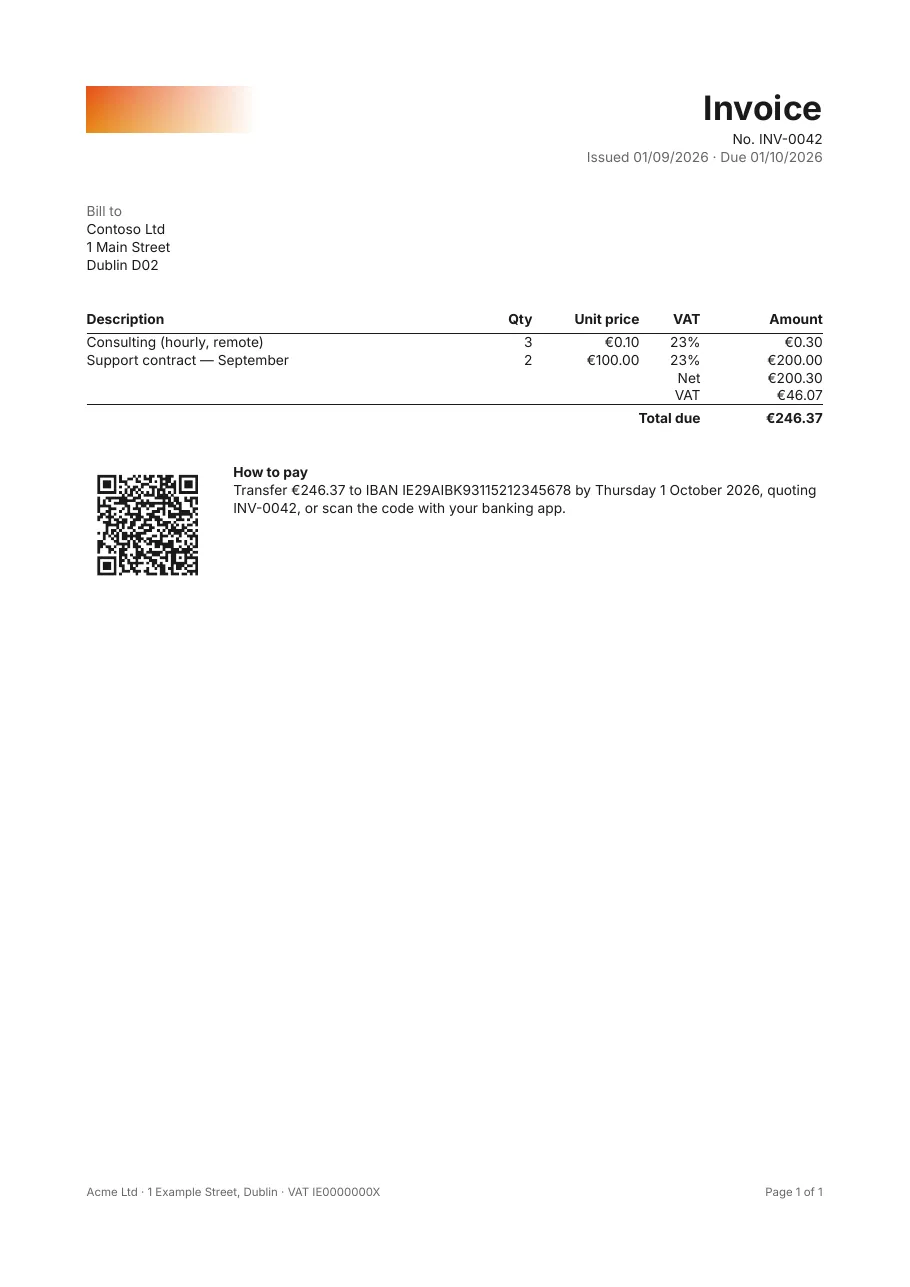
The part that makes it an e-invoice is a few lines:
document:  compliance: [pdf-a-3b, pdf-ua-1]  eInvoice:    standard: factur-x    profile: en16931          # minimum, basic-wl, basic, en16931 or extended    xml: "{FacturXml}"        # the CII XML, here from a parameter
parameters:  FacturXml: { type: string, label: Factur-X CII XML generated by the billing system }
The rest is an ordinary invoice template: header, customer, a table of lines with VAT, totals, and an EPC payment
QR code (the GiroCode that banking apps scan).
The whole template
# yaml-language-server: $schema=../schema/template.schema.json# A Factur-X hybrid invoice: human-readable, accessible PDF (PDF/UA-1) that is also an# archival PDF/A-3 file carrying the machine-readable CII XML.version: 1title: "Invoice {Number}"culture: en-IE
document:  author: Acme Ltd  compliance: [pdf-a-3b, pdf-ua-1]  eInvoice:    standard: factur-x    profile: en16931    xml: "{FacturXml}"
page:  size: A4  margins: 20mm
fonts:  Inter: { regular: fonts/Inter-Regular.ttf, bold: fonts/Inter-Bold.ttf, italic: fonts/Inter-Italic.ttf }
parameters:  FacturXml: { type: string, label: Factur-X CII XML generated by the billing system }
data:  invoice:    fields:      Number: string      IssueDate: date      DueDate: date      CustomerName: string      CustomerAddress: string      Iban: string  lines:    fields:      Description: string      Quantity: decimal      UnitPrice: decimal      VatRate: decimal
variables:  Net: =Sum(Quantity * UnitPrice, 'lines')  Vat: =Sum(Quantity * UnitPrice * VatRate, 'lines')  Total: =Net + Vat
styles:  default: { font: Inter }  # what every band inherits; PDF/A and PDF/UA need it to be an embedded font  base:  { font: Inter, fontSize: 9pt, color: "#1A1A1A", lineHeight: 1.3 }  title: { extends: base, fontSize: 22pt, fontWeight: bold }  muted: { extends: base, color: "#666666" }  th:    { extends: base, fontWeight: bold, borderBottom: "0.75pt solid #1A1A1A", padding: 0 0 3pt 0 }  total: { extends: base, fontWeight: bold, borderTop: "0.75pt solid #1A1A1A", padding: 3pt 0 0 0 }
body:  dataset: invoice
  detail:    - layout: row      style: base      content:        - { type: image, source: assets/acme-logo.png, alt: Acme Ltd, width: 110pt }        - type: stack          width: 1fr          align: right          content:            - { type: text, value: Invoice, style: title, tag: h1 }            - { type: text, value: "No. {Number}" }            - { type: text, value: "Issued {IssueDate:d} · Due {DueDate:d}", style: muted }
    - style: base      padding: 24pt 0      content:        - { type: text, value: Bill to, style: muted, tag: h2 }        - { type: text, value: "{CustomerName}\n{CustomerAddress}" }
    - style: base      content:        - type: table          dataset: lines          headerStyle: th          columns:            - { header: Description, value: "{Description}", width: 1fr }            - { header: Qty,         value: "{Quantity:0.##}", width: 40pt, align: right }            - { header: Unit price,  value: "{UnitPrice:C}", width: 70pt, align: right }            - { header: VAT,         value: "{VatRate:P0}", width: 40pt, align: right }            - { header: Amount,      value: "{Quantity * UnitPrice:C}", width: 80pt, align: right }          footer:            - cells:                - { value: Net, span: 4, align: right, isHeader: true }                - { value: "{Net:C}", align: right }            - cells:                - { value: VAT, span: 4, align: right, isHeader: true }                - { value: "{Vat:C}", align: right }            - style: total              cells:                - { value: Total due, span: 4, align: right, isHeader: true }                - { value: "{Total:C}", align: right }          emptyText: This invoice has no lines.
    - layout: row      style: base      gap: 16pt      padding: 24pt 0 0 0      keepTogether: true      content:        # EPC069-12 "SEPA credit transfer" QR code, scanned by banking apps.        - type: barcode          symbology: qr          width: 80pt          height: 80pt          value: "BCD\n002\n1\nSCT\n\nAcme Ltd\n{Iban}\nEUR{Total:0.00}\n\n{Number}"          alt: "Payment QR code for {Total:C} to {Iban}"        - type: stack          width: 1fr          content:            - { type: text, value: How to pay, tag: h2, fontWeight: bold }            - { type: text, value: "Transfer {Total:C} to IBAN {Iban} by {DueDate:D}, quoting {Number}, or scan the code with your banking app." }
  pageFooter:    - layout: row      style: muted      fontSize: 7.5pt      content:        - { type: text, value: "Acme Ltd · 1 Example Street, Dublin · VAT IE0000000X", width: 1fr }        - { type: text, value: "Page {PageNumber} of {TotalPages}", width: auto }
From C#
Section titled “From C#”-
Produce the CII XML for the invoice with your billing system or an e-invoicing library.
-
Render the template with the invoice’s data, and the XML as a parameter:
var report = CompiledReport.Compile(TemplateLoader.LoadFile("invoice.report.yaml"));var inputs = new ReportInputs{Parameters = new Dictionary<string, object?> { ["FacturXml"] = xml },Data = new Dictionary<string, IDataSet>{["invoice"] = DataSources.FromRows([invoiceRow]),["lines"] = DataSources.FromRows(lineRows),},Resources = new DirectoryResourceResolver("templates"),};await using var pdf = File.Create($"{number}.pdf");var result = await Reports.RenderPdfAsync(report, inputs, pdf); -
Validate the PDF with veraPDF (
verapdf -f 3b invoice.pdf) and the invoice with a Factur-X validator.
Profiles
Section titled “Profiles”The profile says how much of the invoice the XML carries:
profile |
The XML carries |
|---|---|
minimum |
The invoice’s key data, for booking. Not a complete invoice for tax purposes. |
basic-wl |
Header and totals, without lines (“without lines”). |
basic |
A complete invoice with its lines, simplified. |
en16931 |
A complete invoice meeting the European standard: what most mandates require. |
extended |
EN 16931 plus fields for more complex business cases. |
The profile you declare must match the XML you embed.
- PDF/A in .NET and accessible PDFs: the two standards the invoice meets.
- The
document.eInvoicereference.