

Factur-X invoice
The invoice lists its lines with VAT, adds them up in variables, and ends with a payment QR code that banking apps scan (an EPC code, the “GiroCode”, with the amount and the reference). It is PDF/A-3b and PDF/UA-1, and a Factur-X invoice: its CII XML, supplied as a parameter, is attached with the metadata e-invoicing systems look for. See the Factur-X guide.
Standards: PDF/A-3b · PDF/UA-1, checked with veraPDF on every change. Download the PDF.
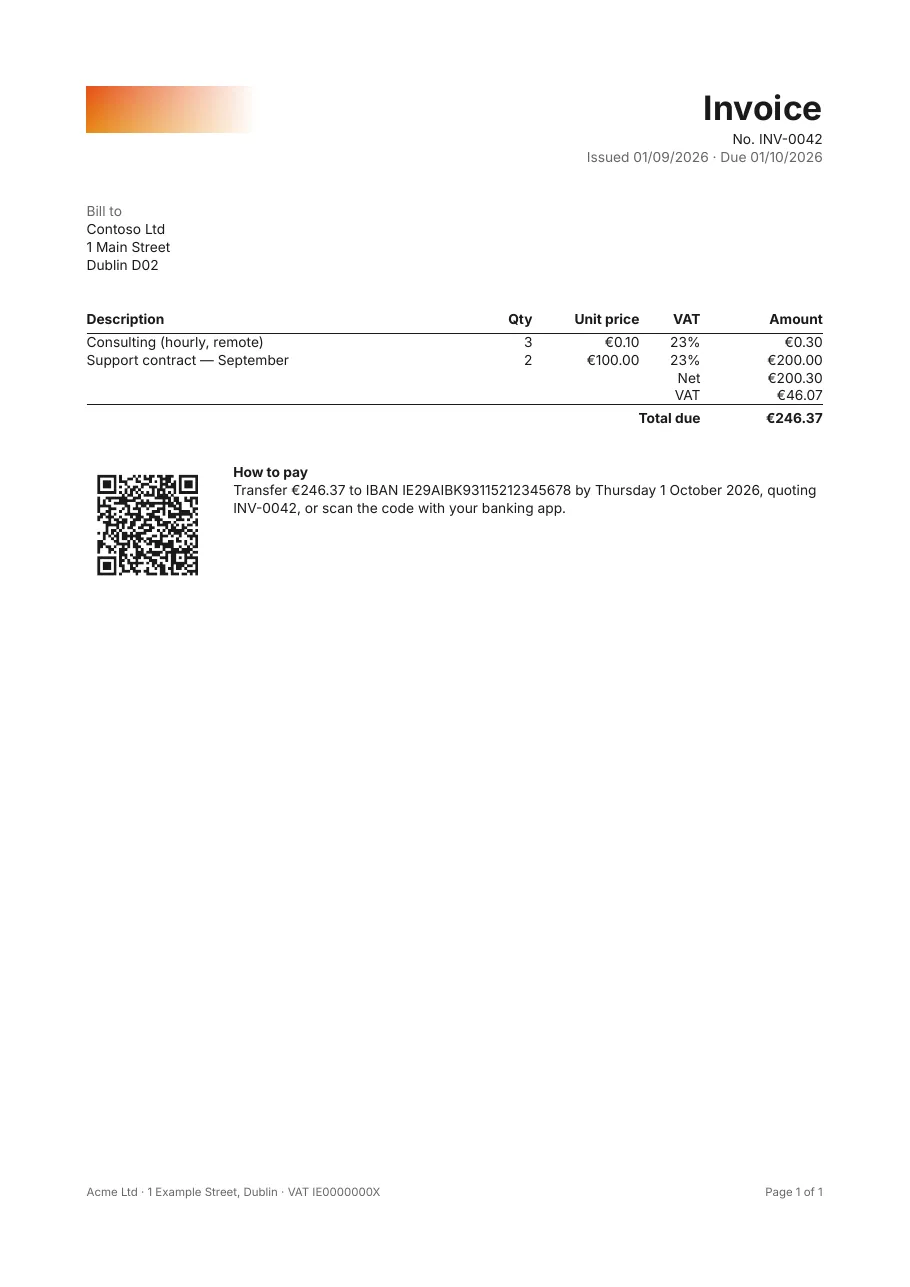
What it shows
Section titled “What it shows”- A table with VAT per line and totals from variables
- Text templates with currency and date formats
- A QR code built from the data
- Factur-X: the XML attached, with its XMP metadata
- PDF/A-3b and PDF/UA-1 together
The template
Section titled “The template”# yaml-language-server: $schema=../schema/template.schema.json# A Factur-X hybrid invoice: human-readable, accessible PDF (PDF/UA-1) that is also an# archival PDF/A-3 file carrying the machine-readable CII XML.version: 1title: "Invoice {Number}"culture: en-IE
document: author: Acme Ltd compliance: [pdf-a-3b, pdf-ua-1] eInvoice: standard: factur-x profile: en16931 xml: "{FacturXml}"
page: size: A4 margins: 20mm
fonts: Inter: { regular: fonts/Inter-Regular.ttf, bold: fonts/Inter-Bold.ttf, italic: fonts/Inter-Italic.ttf }
parameters: FacturXml: { type: string, label: Factur-X CII XML generated by the billing system }
data: invoice: fields: Number: string IssueDate: date DueDate: date CustomerName: string CustomerAddress: string Iban: string lines: fields: Description: string Quantity: decimal UnitPrice: decimal VatRate: decimal
variables: Net: =Sum(Quantity * UnitPrice, 'lines') Vat: =Sum(Quantity * UnitPrice * VatRate, 'lines') Total: =Net + Vat
styles: default: { font: Inter } # what every band inherits; PDF/A and PDF/UA need it to be an embedded font base: { font: Inter, fontSize: 9pt, color: "#1A1A1A", lineHeight: 1.3 } title: { extends: base, fontSize: 22pt, fontWeight: bold } muted: { extends: base, color: "#666666" } th: { extends: base, fontWeight: bold, borderBottom: "0.75pt solid #1A1A1A", padding: 0 0 3pt 0 } total: { extends: base, fontWeight: bold, borderTop: "0.75pt solid #1A1A1A", padding: 3pt 0 0 0 }
body: dataset: invoice
detail: - layout: row style: base content: - { type: image, source: assets/acme-logo.png, alt: Acme Ltd, width: 110pt } - type: stack width: 1fr align: right content: - { type: text, value: Invoice, style: title, tag: h1 } - { type: text, value: "No. {Number}" } - { type: text, value: "Issued {IssueDate:d} · Due {DueDate:d}", style: muted }
- style: base padding: 24pt 0 content: - { type: text, value: Bill to, style: muted, tag: h2 } - { type: text, value: "{CustomerName}\n{CustomerAddress}" }
- style: base content: - type: table dataset: lines headerStyle: th columns: - { header: Description, value: "{Description}", width: 1fr } - { header: Qty, value: "{Quantity:0.##}", width: 40pt, align: right } - { header: Unit price, value: "{UnitPrice:C}", width: 70pt, align: right } - { header: VAT, value: "{VatRate:P0}", width: 40pt, align: right } - { header: Amount, value: "{Quantity * UnitPrice:C}", width: 80pt, align: right } footer: - cells: - { value: Net, span: 4, align: right, isHeader: true } - { value: "{Net:C}", align: right } - cells: - { value: VAT, span: 4, align: right, isHeader: true } - { value: "{Vat:C}", align: right } - style: total cells: - { value: Total due, span: 4, align: right, isHeader: true } - { value: "{Total:C}", align: right } emptyText: This invoice has no lines.
- layout: row style: base gap: 16pt padding: 24pt 0 0 0 keepTogether: true content: # EPC069-12 "SEPA credit transfer" QR code, scanned by banking apps. - type: barcode symbology: qr width: 80pt height: 80pt value: "BCD\n002\n1\nSCT\n\nAcme Ltd\n{Iban}\nEUR{Total:0.00}\n\n{Number}" alt: "Payment QR code for {Total:C} to {Iban}" - type: stack width: 1fr content: - { type: text, value: How to pay, tag: h2, fontWeight: bold } - { type: text, value: "Transfer {Total:C} to IBAN {Iban} by {DueDate:D}, quoting {Number}, or scan the code with your banking app." }
pageFooter: - layout: row style: muted fontSize: 7.5pt content: - { type: text, value: "Acme Ltd · 1 Example Street, Dublin · VAT IE0000000X", width: 1fr } - { type: text, value: "Page {PageNumber} of {TotalPages}", width: auto }Its data
Section titled “Its data”# Example data for invoice.report.yaml, used by `tagua render samples/invoice.report.yaml` (Tagua.Samples has the# same data in C#). A data file mirrors the template: parameter values by name, and the rows of each dataset.parameters: FacturXml: >- <?xml version="1.0" encoding="UTF-8"?><rsm:CrossIndustryInvoice xmlns:rsm="urn:un:unece:uncefact:data:standard:CrossIndustryInvoice:100"/>
data: invoice: - Number: INV-0042 IssueDate: 2026-09-01 DueDate: 2026-10-01 CustomerName: Contoso Ltd CustomerAddress: "1 Main Street\nDublin D02" Iban: IE29AIBK93115212345678 lines: - { Description: "Consulting (hourly, remote)", Quantity: 3, UnitPrice: 0.10, VatRate: 0.23 } - { Description: Support contract — September, Quantity: 2, UnitPrice: 100.00, VatRate: 0.23 }Render it yourself
Section titled “Render it yourself”Save the template, put the fonts it names next to it (Inter and the Noto fonts are free, under the SIL Open Font License), and run:
tagua render invoice.report.yaml --openWith invoice.data.yaml next to it, it renders with that data.