

Your first report
This report lists orders with their totals and a grand total at the end.
-
Write the template. Save it as
orders.report.yaml:orders.report.yaml title: Ordersculture: en-USdata:orders: { fields: { Customer: string, Total: decimal } }body:detail:- layout: rowcontent:- { type: text, value: "{Customer}", width: 3fr }- { type: text, value: "{Total:C}", width: 1fr, align: end }reportFooter:- content:- { type: text, value: "Total {Sum(Total):C}", fontWeight: bold, align: end }datadeclares the dataset’s shape: its fields and their types. The rows come from your application.body.detailis repeated for every row. Itsrowlayout puts the two texts side by side;3frand1frshare the width three to one.{Customer}and{Total:C}are text templates: an expression in braces, with an optional .NET format (Cis currency, in the template’sculture).reportFooterappears once, after the rows;Sum(Total)adds up every row.
-
Render it from C#. With the
Taguapackage installed:Program.cs using Tagua;using Tagua.Fill;using Tagua.Pipeline;using Tagua.Serialization;TaguaSettings.License = LicenseType.Community; // once, at startup (see the licensing terms)var report = CompiledReport.Compile(TemplateLoader.LoadFile("orders.report.yaml"));var inputs = new ReportInputs{Data = new Dictionary<string, IDataSet>{["orders"] = DataSources.FromRows([new Dictionary<string, object?> { ["Customer"] = "Contoso", ["Total"] = 1250.00m },new Dictionary<string, object?> { ["Customer"] = "Fabrikam", ["Total"] = 480.50m },]),},// Fonts, images and subreports named in the template are opened from here.Resources = new DirectoryResourceResolver("."),};await using var pdf = File.Create("orders.pdf");var result = await Reports.RenderPdfAsync(report, inputs, pdf);foreach (var diagnostic in result.Diagnostics) Console.WriteLine(diagnostic);CompiledReport.Compilechecks the template and type-checks its expressions, so a typo such as{Totl}is an error with its location before any data is read. The rows here are in memory;DataSources.FromDataReaderreads them from any database instead. -
Open
orders.pdf: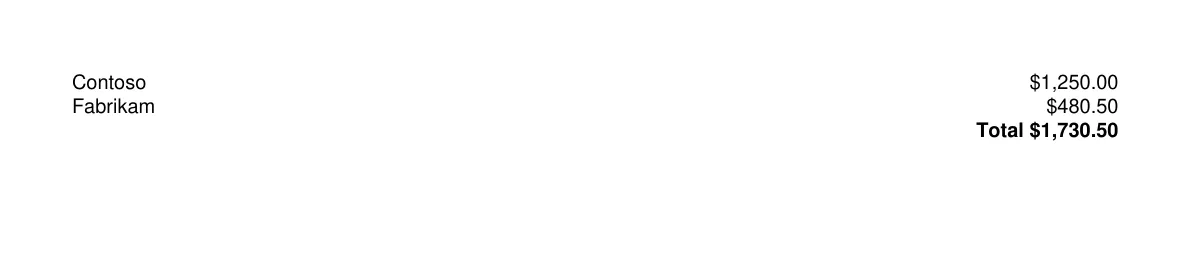
Without writing code
Section titled “Without writing code”The tagua command renders the same template from the command line, with its data in a file next to it:
data: orders: - { Customer: Contoso, Total: 1250.00 } - { Customer: Fabrikam, Total: 480.50 }tagua render orders.report.yaml --watch --openEvery property used here, and all the others, is in the template reference: the text element, bands, and the values such as lengths and colors.