

Accessible PDFs in .NET with PDF/UA
An accessible PDF is one that people who use screen readers, magnifiers or keyboards can read as well as anyone else. Visually it looks like any other PDF; what makes the difference is a structure tree inside it, which says what each thing on the page is (a heading, a paragraph, a table cell, an image and its description) and the order to read them in. That is a tagged PDF, and PDF/UA (ISO 14289) is the standard that says what a tagged PDF must contain to be accessible.
Accessibility is also a legal requirement more and more often: the European Accessibility Act applies to many digital services in the EU from June 2025, public bodies in the EU and the US (Section 508) have required it for longer, and customers increasingly ask for it. Check which rules apply to you.
Why it is hard in .NET, and what Tagua does
Section titled “Why it is hard in .NET, and what Tagua does”Most PDF libraries draw text and lines at positions, and tagging is left to you: every paragraph, heading and table cell has to be wrapped in the right structure element, in reading order, by hand. Report writers mostly produce untagged PDFs. So accessible documents usually need a separate remediation step.
Tagua tags every document by default, from the template:
- Text is a paragraph (
P);tag: h1toh6makes it a heading. Headings must start ath1and not skip levels. - Tables become real tables: header cells (
TH) with their scope, rows and data cells, even across pages. - Images and barcodes are figures with the alternative text you give in
alt. - Page headers and footers, and anything you mark
tag: artifact, are kept out of the reading order. - Links are tagged as links, with their target described for assistive technology, and the document has a title and a language.
With compliance: [pdf-ua-1], Tagua checks the template for what PDF/UA requires before any data is read: a title,
a language, alternative text for every image, embedded fonts and headings in order. A mistake is an error with its
location, not a document that fails later.
An example
Section titled “An example”This report is PDF/UA-1. It passes veraPDF, the reference validator, and you can download the PDF to try it with a screen reader.
# An accessible report (PDF/UA-1): a title and a language, headings in order, a table with header cells, alternative# text for the image, a decorative rule kept out of the reading order, and a link.title: Accessibility review, third quarterlanguage: en-GBculture: en-GB
document:  author: Contoso Ltd  compliance: [pdf-ua-1]
fonts:  Inter: { regular: fonts/Inter-Regular.ttf, bold: fonts/Inter-Bold.ttf }
styles:  default: { font: Inter, fontSize: 10pt, lineHeight: 1.4 }  th: { fontWeight: bold, borderBottom: "0.75pt solid #3E2A1A", padding: 0 0 3pt 0 }
data:  services: { fields: { Service: string, Documents: int32, Passed: int32 } }
body:  reportHeader:    - gap: 8pt      content:        - { type: image, source: banner.png, width: 180pt, alt: "Tagua: accessible, archival PDF reports for .NET" }        - { type: text, value: "Accessibility review, third quarter", fontSize: 18pt, fontWeight: bold, tag: h1 }        - type: text          value: >-            Every document our services produced this quarter was checked against PDF/UA. This table shows how many            passed, by service.        - { type: text, value: Results by service, fontSize: 13pt, fontWeight: bold, tag: h2 }        - type: table          dataset: services          headerStyle: th          columns:            - { header: Service, value: "{Service}", width: 3fr }            - { header: Documents, value: "{Documents:N0}", width: 1fr, align: end }            - { header: Passed, value: "{Passed:N0}", width: 1fr, align: end }            - { header: Rate, value: "{Passed / Documents:P0}", width: 1fr, align: end }          footer:            - cells:                - { value: Total, isHeader: true, fontWeight: bold }                - { value: "{Sum(Documents):N0}", align: end, fontWeight: bold }                - { value: "{Sum(Passed):N0}", align: end, fontWeight: bold }                - { value: "{Sum(Passed) / Sum(Documents):P0}", align: end, fontWeight: bold }        - { type: line, stroke: "0.5pt solid #A3968A", tag: artifact }        - type: text          value: How the documents are checked is explained at taguareports.com.          link: https://taguareports.com
pageFooter: - content: - { type: text, value: "Page {PageNumber} of {TotalPages}", fontSize: 8pt, align: end }data: services: - { Service: Invoicing, Documents: 18240, Passed: 18240 } - { Service: Statements, Documents: 9120, Passed: 9054 } - { Service: Letters, Documents: 2305, Passed: 2251 }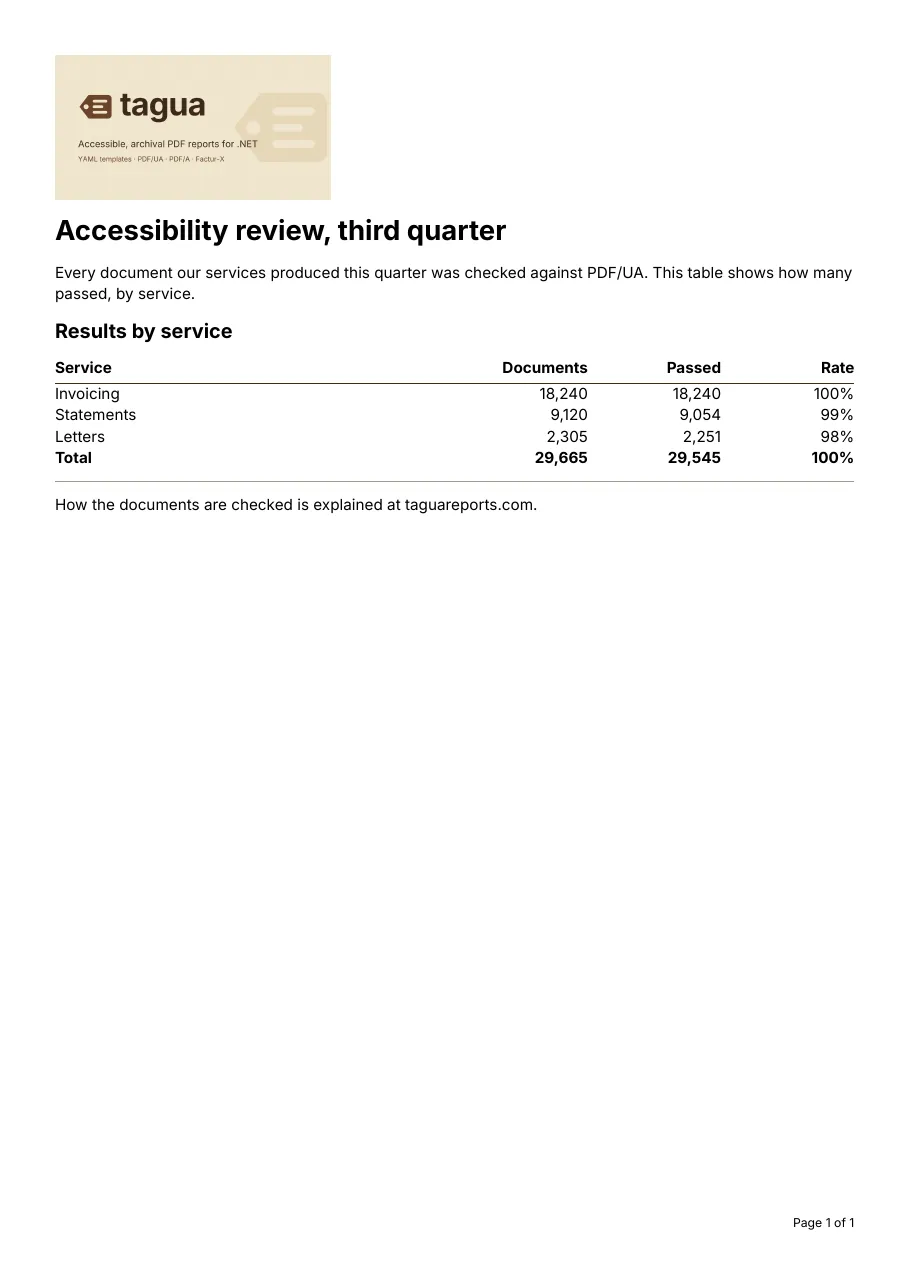
What makes it accessible:
titleandlanguage(en-GB): the title is shown in the viewer’s title bar and read first; the language tells a screen reader how to pronounce the text. An element in another language takes its ownlanguage.tag: h1andtag: h2give the document an outline that screen readers navigate by.- The table’s header row becomes
THcells, andisHeader: truemakes the footer’s “Total” a row header, so each number is read with its column and row. altdescribes the image. A decorative image would betag: artifactinstead.- The rule under the table is
tag: artifact: it is decoration, not content. - The fonts are embedded (
fonts), so the text can be extracted exactly, which PDF/UA requires.
Render it from C# like any other report (see your first report), or with
tagua render accessible-report.report.yaml.
PDF/UA-1 or PDF/UA-2
Section titled “PDF/UA-1 or PDF/UA-2”pdf-ua-1 (2014) is what most checkers and procurement requirements ask for today. pdf-ua-2 (2024) is based on
PDF 2.0; Tagua writes a PDF 2.0 file for it, and it combines with pdf-a-4 or pdf-a-4f rather than PDF/A-2 or
PDF/A-3. Accessibility and archiving combine well: compliance: [pdf-a-2b, pdf-ua-1] gives a document that is both.
See PDF/A in .NET.
Checking the result
Section titled “Checking the result”-
Validate it with veraPDF, which checks the machine-checkable rules of PDF/UA:
Terminal window verapdf -f ua1 accessible-report.pdfTagua’s own tests run veraPDF on every sample on every change.
-
Check it with PAC, the free PDF Accessibility Checker, which also shows the structure tree and a screen reader preview.
-
Listen to it with a screen reader: NVDA on Windows, VoiceOver on macOS. Validators check the rules; only a person can tell whether the alternative text is useful and the reading order makes sense.
- The template reference documents
tag,altandlanguageon every element. - Factur-X invoices are PDF/A-3 and PDF/UA-1 at the same time.