

Account statement
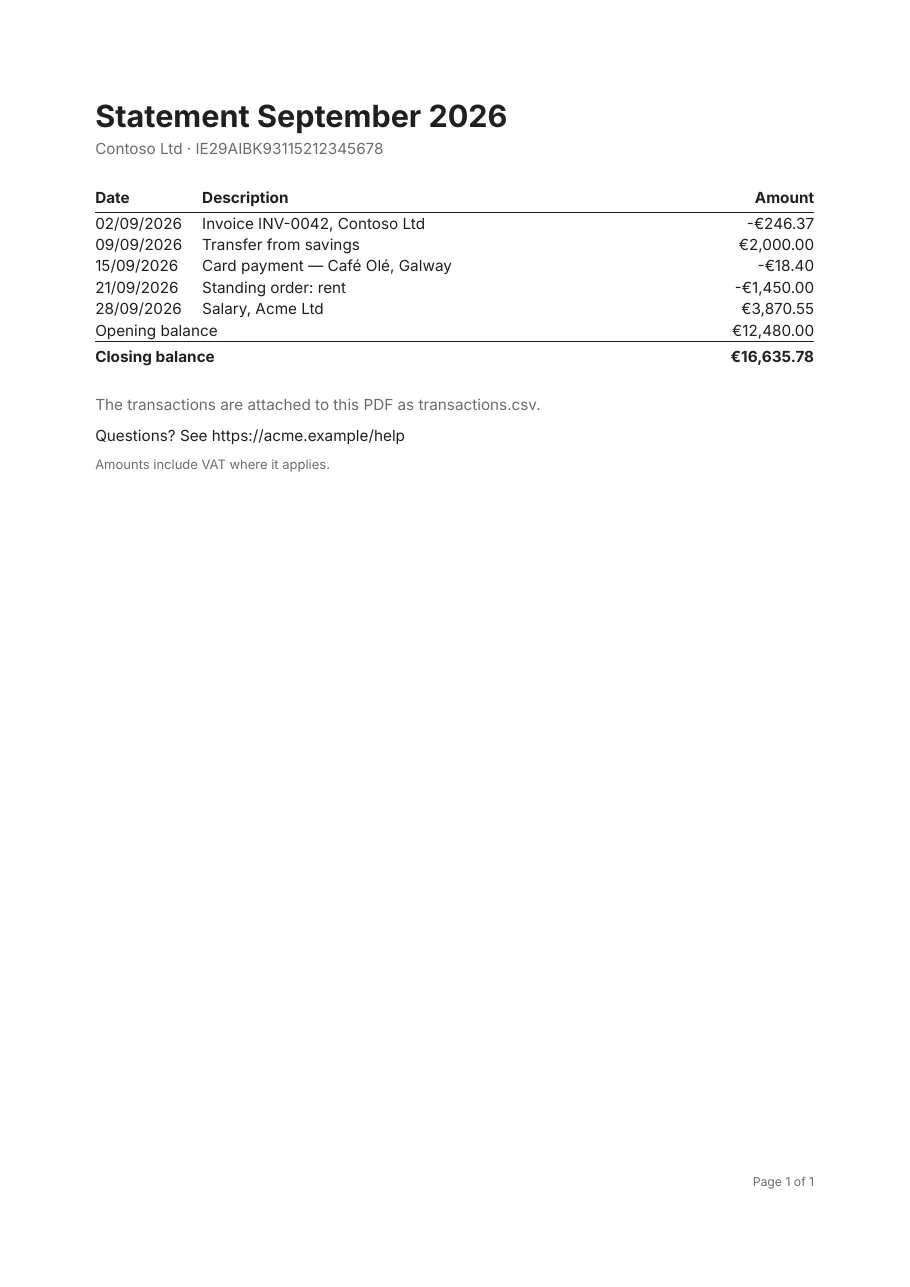
A bank-style statement: the period’s transactions between an opening and a closing balance. It is PDF 2.0, meeting PDF/A-4f and PDF/UA-2 together, and carries the transactions as a CSV attachment for people who want the data, not the page.
Standards: PDF/A-4f · PDF/UA-2, checked with veraPDF on every change. Download the PDF.
What it shows
Section titled “What it shows”- PDF/A-4f and PDF/UA-2 (PDF 2.0)
- An attachment built from a parameter
- Table footer rows with row headers (the balances)
- Page footers with “page n of m”
The template
Section titled “The template”# yaml-language-server: $schema=../schema/template.schema.json# An account statement as PDF 2.0: PDF/A-4f, with the transactions attached as CSV, and PDF/UA-2.version: 1title: "Statement {Period}"culture: en-IE
document: author: Acme Ltd compliance: [pdf-a-4f, pdf-ua-2] attachments: - name: transactions.csv source: "{Csv}" mimeType: text/csv relationship: data description: The statement's transactions as comma-separated values
page: size: A4 margins: 22mm
fonts: Inter: { regular: fonts/Inter-Regular.ttf, bold: fonts/Inter-Bold.ttf }
styles: default: { font: Inter, fontSize: 10pt, lineHeight: 1.4, color: "#1F1F1F" } muted: { color: "#6B6B6B" } th: { fontWeight: bold, borderBottom: "0.75pt solid #1F1F1F", padding: 0 0 3pt 0 } total: { fontWeight: bold, borderTop: "0.75pt solid #1F1F1F", padding: 3pt 0 0 0 }
parameters: Csv: { type: string, label: The transactions as CSV }
data: account: fields: { Holder: string, Iban: string, Period: string, Opening: decimal } transactions: fields: { Date: date, Description: string, Amount: decimal }
body: dataset: account
detail: - content: - { type: text, value: "Statement {Period}", fontSize: 20pt, fontWeight: bold, tag: h1 } - { type: text, value: "{Holder} · {Iban}", style: muted }
- padding: 18pt 0 0 0 content: - type: table dataset: transactions headerStyle: th columns: - { header: Date, value: "{Date:d}", width: 70pt } - { header: Description, value: "{Description}", width: 1fr } - { header: Amount, value: "{Amount:C}", width: 90pt, align: right } footer: - cells: - { value: Opening balance, span: 2, isHeader: true } - { value: "{Opening:C}", align: right } - style: total cells: - { value: Closing balance, span: 2, isHeader: true } - { value: "{Opening + Sum(Amount):C}", align: right }
- padding: 18pt 0 0 0 gap: 6pt content: - { type: text, value: "The transactions are attached to this PDF as transactions.csv.", style: muted } - { type: text, value: "Questions? See https://acme.example/help", link: "https://acme.example/help" } - { type: text, value: "Amounts include VAT where it applies.", tag: note, style: muted, fontSize: 8.5pt }
pageFooter: - content: - { type: text, value: "Page {PageNumber} of {TotalPages}", align: right, style: muted, fontSize: 8pt }Render it yourself
Section titled “Render it yourself”Save the template, put the fonts it names next to it (Inter and the Noto fonts are free, under the SIL Open Font License), and run:
tagua render statement.report.yaml --openWithout a data file, tagua render makes up sample rows from the field types; see Preview as you edit.