

Image element
A PNG or JPEG image.
- { type: image, source: ... }Example
Section titled “Example”title: Imagesbody: reportHeader: - layout: row gap: 16pt content: - type: stack width: 80pt gap: 4pt content: - { type: image, source: banner.png, fit: contain, height: 80pt, border: "0.5pt solid #A3968A", alt: "The Tagua banner, fitted inside the box" } - { type: text, value: contain, fontSize: 9pt, align: center } - type: stack width: 80pt gap: 4pt content: - { type: image, source: banner.png, fit: cover, height: 80pt, border: "0.5pt solid #A3968A", alt: "The Tagua banner, covering the box" } - { type: text, value: cover, fontSize: 9pt, align: center } - type: stack width: 80pt gap: 4pt content: - { type: image, source: banner.png, fit: fill, height: 80pt, border: "0.5pt solid #A3968A", alt: "The Tagua banner, stretched to the box" } - { type: text, value: fill, fontSize: 9pt, align: center }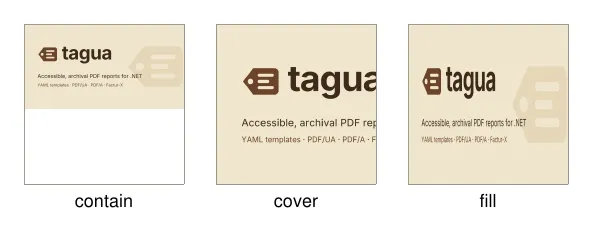
Properties
Section titled “Properties”source
Section titled “source”Type: text · Required
Text template: a path/URI resolved by the host ("assets/{Code}.png") or a single expression over bytes ("{Logo}").
Type: text
Alternative text (template). Required under PDF/UA unless tagged as an artifact.
Type: keyword · Default: contain
How the image fills its box.
One of:
contain: Scaled to fit inside the box, keeping its proportions.cover: Scaled to cover the box, keeping its proportions; what overflows is clipped.fill: Stretched to the box.none: At its own size (96 dpi), clipped to the box.
It also has the properties of every element and the style properties.